Tasmota tools
A toolbox for when something goes wrong. It can restart a panel, open its web interface, reinstall the Berry driver or the TFT firmware individually and — in expert mode — reset Tasmota to factory settings.
The tab is only visible in expert mode. Toggle it with the head icon at the bottom left of the admin sidebar; the setting applies to the current browser session only. It can be made permanent in the ioBroker system settings.
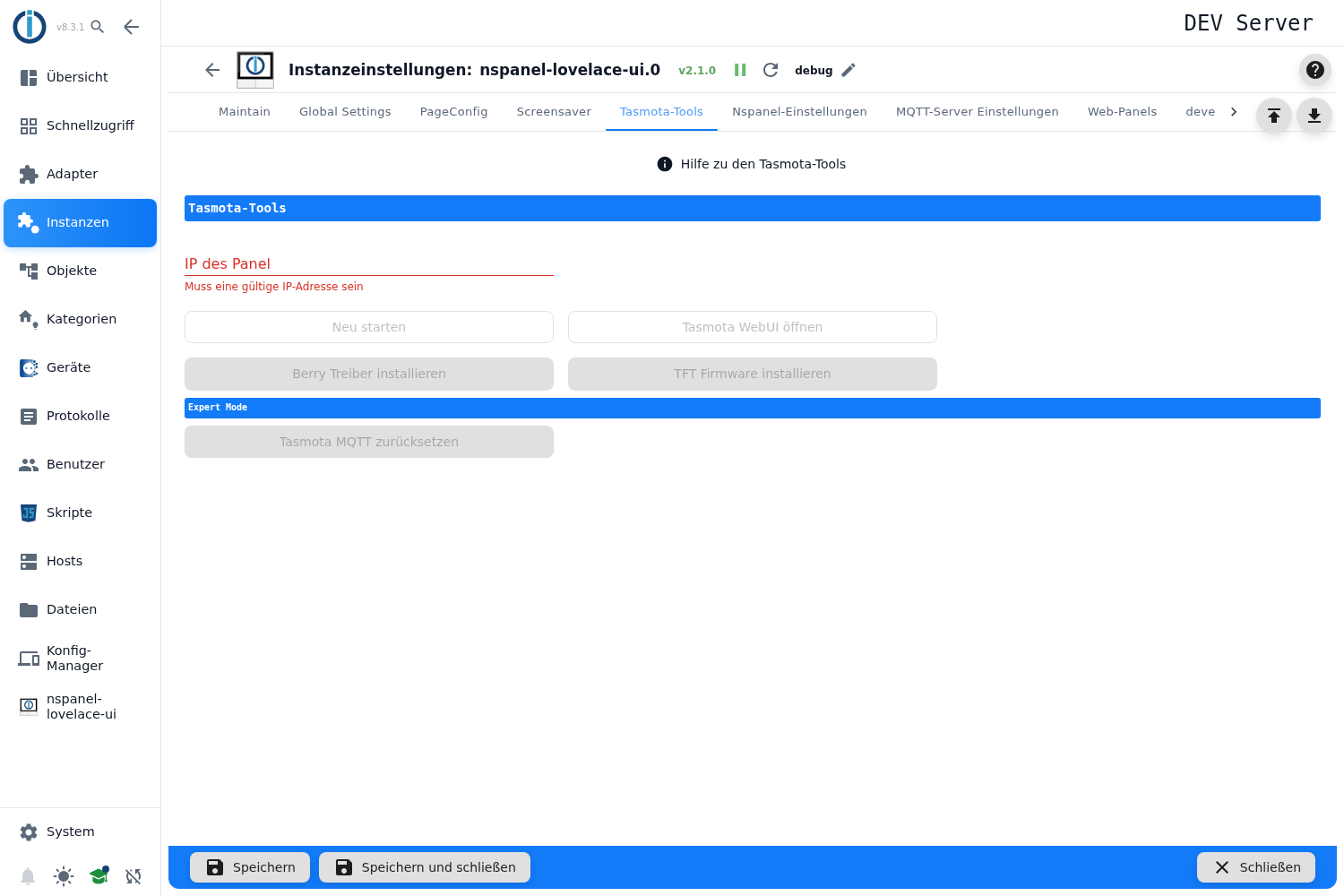
Above the tools sits the red button Help on the Tasmota tools; it opens this page in the browser.
Normal operation needs none of this. When a panel is set up, the NSPanel initialisation does all of it automatically; these tools exist for the case that one of those steps has to be repeated.
The tools
First pick the device in the IP of the panel field — the list suggests the known panels, and a foreign IP can be typed in. Only then do the buttons become active.
| Button | Effect |
|---|---|
| Restart | Restarts Tasmota on the panel. Asks for confirmation first, see The confirmation dialogs. |
| Open Tasmota WebUI | Opens the panel's web interface in a new tab. |
| Install Berry driver | Installs the Berry driver again. The panel downloads the file itself from the internet — without internet access it fails. |
| Install TFT firmware | Reinstalls the display firmware, matching the hardware model and the beta TFT setting. Takes a few minutes and restarts the panel. |
| Reset Tasmota MQTT (section Expert Mode) | ⚠️ Factory reset of the Tasmota configuration. The admin asks first, see The confirmation dialogs. The Wi-Fi credentials survive; everything else — MQTT, topic, template — is gone and the panel has to be initialised again. This is exactly the command needed when a panel was attached to another host before. |
The confirmation dialogs
Two buttons ask before they act. Both dialogs follow the language of the admin:
| Button | Title | Text |
|---|---|---|
| Restart | Restart Tasmota | Restart the NSPanel running Tasmota? |
| Reset Tasmota MQTT | Reset NSPanel | Resets the Tasmota configuration of the panel to factory defaults (Wi-Fi is kept). |
When it does not work
- Buttons stay grey: no IP is selected, or the instance is not running.
- Berry install without a success message: the panel has no internet access, or the web interface is password protected and the password is missing in the MQTT server settings.
- The panel is silent after the factory reset: that is expected — initialise it again through NSPanel settings.
