Page Thermo (classic) – configuration in the admin
The classic thermostat page cardThermo shows one thermostat: on the left the actual temperature and the humidity, in the middle the set point with the − and + keys, below it a bar with eight slots for mode icons and status displays. It is created in the tab PageConfig, page type Thermostat (classic).
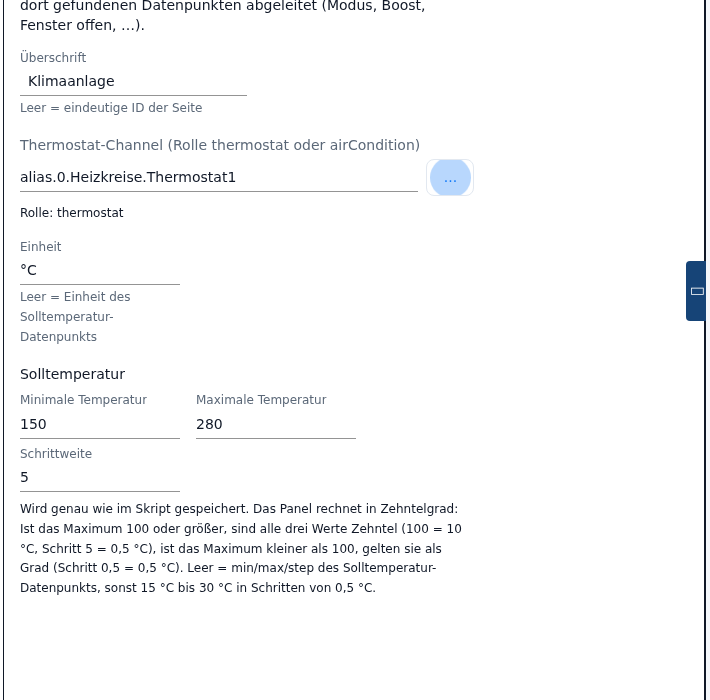
Only the Headline, the Thermostat channel, the Unit and the limits of the set temperature are configured. Everything else is derived by the adapter from the states it finds below the channel – the editor says so itself: "Classic thermostat page: one alias channel with the role thermostat or airCondition. The adapter reads the actual, set and humidity states below the channel; the buttons at the bottom are not configured but derived from the states it finds there (mode, boost, window open, ...)."
In the adapter the admin page runs through the same code as a cardThermo page from a script (ConfigManager.getPageThermo); with the same entries the result on the panel is identical.
Contents:
- Creating the page
- cardThermo or cardThermo2
- The fields of the editor
- Minimum, maximum, step
- What the adapter builds from the states
- Eight slots and the paging arrow
- Saving, panel assignment, navigation
- Take-over from the script
- Pitfalls
1. Creating the page
- Open the instance settings → tab PageConfig.
- In the list Pages on the left click the PLUS, choose the type Thermostat (classic) and enter a Unique ID (the page name the navigation refers to).
- The new page appears in the list; the editor opens on the right. A new page has no channel yet – without a channel the adapter builds an empty card and writes the reason as an error into the log of the instance.
The fields Panel Filter and Page Type above the list only filter what the list shows.
2. cardThermo or cardThermo2
Both cards control heating and air conditioning, they differ in scope:
cardThermo (classic) |
cardThermo2 |
|
|---|---|---|
| Data sources per page | exactly one | up to eight |
| Own slots (page items) | none in the admin – the eight slots are filled by the adapter alone | own page items per heat circuit, in addition to the generated buttons |
airCondition with SET and SET2 |
shows two set points side by side on one card | becomes two heat circuits (heating and cooling) with one set point each |
| Mode icons | only from the MODE state of an airCondition channel; with the role thermostat there are none |
own mode display with freely chosen mode texts |
| Icon, color and unit of the value lines | not configurable | adjustable per line |
| Paging | automatic as soon as more than eight slots come together – not adjustable | three paging modes in the page details |
| Option Values in tenths (tab Global Settings) | without effect | applies to the limits of the set temperature |
In short: cardThermo is the quick card for one thermostat whose alias brings along many states (window, party, vacation, error …), and the only card that shows two set points of an airCondition channel side by side. Whoever needs several heat circuits, own buttons or an adjustable appearance takes cardThermo2.
3. The fields of the editor
| Field | Meaning |
|---|---|
| Unique ID | Page name; read-only, fixed once the page exists. On the start page the note names the id main. |
| Headline | Header line of the page on the panel. Hint text: Empty = unique ID of the page. |
| Thermostat channel (role thermostat or airCondition) | Alias channel, device or folder with common.role thermostat or airCondition. The object tree behind … shows only objects with these roles; an ID typed in by hand is checked by the editor when the field is left. If it matches, Role: … appears below it, otherwise a warning: The object … was not found or The channel … has the role "…" – expected thermostat or airCondition. Which states the adapter looks for below the channel is in section 5 and in the alias table. |
| Unit | Text behind the temperatures (e.g. °C). Hint text: Empty = unit of the set temperature state – that applies to the big number, the line of the actual temperature then stays without a unit (see Pitfalls). The humidity always shows %. |
| Set temperature with Minimum temperature, Maximum temperature, Step | Limits and step of the set point, see section 4. |
The labels of the value lines on the panel are fixed: Temperature above the actual temperature, Humidity above the humidity. The actual temperature shows one decimal place, the humidity none.
Start page (main), Hidden, Screensaver behavior and the navigation targets are on the right in the column Navigation/Panel – described under PageConfig and page details. Paging settings do not appear there for this card; they belong to the menu, Thermo2 and media pages only.
4. Minimum, maximum, step
The three values are stored exactly as the script would have them – so that a page taken over keeps its numbers. Which unit they have is decided by the adapter from the maximum; the hint text below the fields says the same:
- Maximum ≥ 100: all three values are tenths of a degree –
100 / 300 / 1means 10 °C to 30 °C in steps of 0.1 °C; a step of5would be 0.5 °C. - Maximum < 100: all three values count as degrees and are multiplied by 10 –
15 / 28 / 0.5means 15 °C to 28 °C in steps of 0.5 °C. - A step below one tenth of a degree is raised to one tenth by the adapter.
- Empty fields: the adapter takes
common.min/common.max/common.stepof the set temperature state; without them 15 °C to 30 °C in steps of 0.5 °C apply. A0, on the other hand, stays a valid minimum.
The option Values in tenths in the tab Global Settings concerns cardThermo2 only, not this page – its hint text says so explicitly.
5. What the adapter builds from the states
Below the headline nothing is configured. The adapter looks below the channel for common.role and common.type (see the alias table) and builds the values and the bar from them. Only the set point SET is required; without it the build of the page stops with an error in the log.
Which states are looked for at all depends on the role of the channel:
| Role | Evaluated |
|---|---|
thermostat |
SET (level.temperature, required), ACTUAL (value.temperature, SET as a substitute), HUMIDITY (value.humidity) · bar: POWER (switch.power), BOOST (switch.mode.boost / switch.boost), WINDOWOPEN (sensor.window), PARTY (switch.mode.party), MAINTAIN (indicator.maintenance), UNREACH (indicator.maintenance.unreach), LOWBAT (indicator.maintenance.lowbat), ERROR (indicator.error), VACATION (state with exactly this name), WORKING (indicator.working) |
airCondition |
SET and SET2 (both level.temperature, both have to carry exactly these names), ACTUAL, HUMIDITY · bar: MODE (value.mode.airconditioner), POWER (switch), BOOST, MAINTAIN, UNREACH, ERROR |
Not evaluated are MODE and MODESET with the role thermostat as well as USERICON, SPEED, SWING and SWING2; WINDOWOPEN, PARTY, LOWBAT, VACATION and WORKING are known to the role thermostat only.
Switchable are only those slots whose state may be written: the mode icons, POWER, BOOST and PARTY. WINDOWOPEN, MAINTAIN, UNREACH, LOWBAT, ERROR, VACATION and WORKING are pure displays – pressing them does nothing.
The following pictures show the four typical results.
Thermostat: one set point
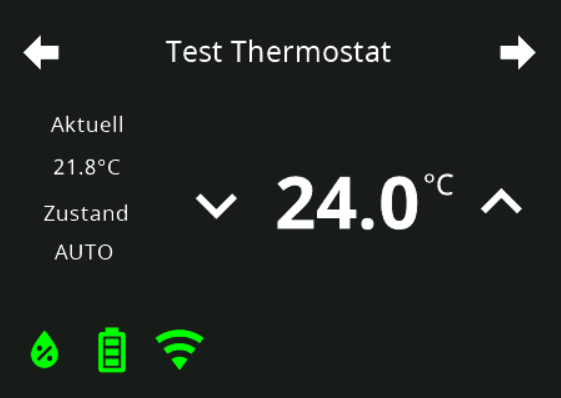
Role thermostat. On the left Temperature (ACTUAL) and – if a HUMIDITY state is present – Humidity; in the middle the set point SET with the − and + keys. The bar at the bottom is filled by the optional states named above, one slot per state found. The auto / manual buttons of the picture come from the original script: for this role the adapter does not look for states AUTOMATIC, MANUAL or OFF and therefore never generates those buttons. A MODE state does not become icons with thermostat either.
Air conditioner: mode icons
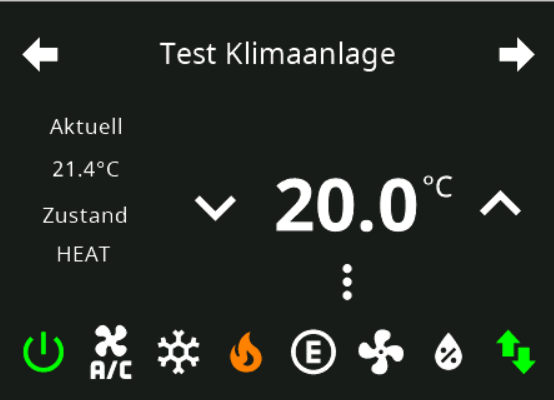
Role airCondition with a MODE state. The adapter derives the icons from common.states of that state; the entries have to be the English keywords, and both shapes of common.states work:
- Value → keyword mapping (
{"0": "OFF", "1": "AUTO", "2": "COOL"}), the usual case in ioBroker: the slot writes the key under which its keyword stands. If the keywords themselves are the keys ({"OFF": "off", "AUTO": "automatic"}), the slot writes the keyword. - List (
["OFF", "AUTO", "COOL"]): the slot writes the position in the list.
If the MODE state is of type string, the slot writes the keyword itself in both cases. Recognised, in this order, are: OFF (power-off), AUTO (alpha-a-circle), COOL (snowflake), HEAT (fire), ECO (alpha-e-circle-outline), FAN_ONLY (fan), DRY (water-percent). Keywords missing from common.states get no icon; translated texts ({"0": "off", "1": "automatic"}) are not recognised by the adapter – then no mode icon appears at all. Without any common.states the built-in list OFF, AUTO, COOL, HEAT, ECO, FAN_ONLY, DRY applies (position = value) with all seven icons. Only AUTO has an icon of its own for the inactive state (the outlined A); the other modes show the same icon in the off colour when inactive. After them follow the slots of the remaining states (POWER, BOOST, MAINTAIN, UNREACH, ERROR).
Air conditioner: two set points
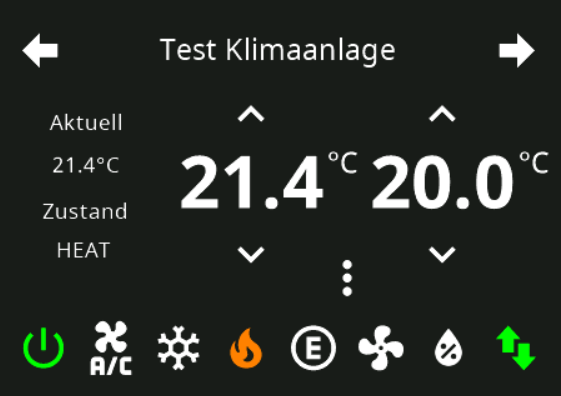
Role airCondition with SET and SET2: the panel shows two set points side by side, e.g. heating and cooling. Both states have to be named exactly SET and SET2, otherwise the adapter does not find them. The bar below as in the picture before.
Heat pump: four modes
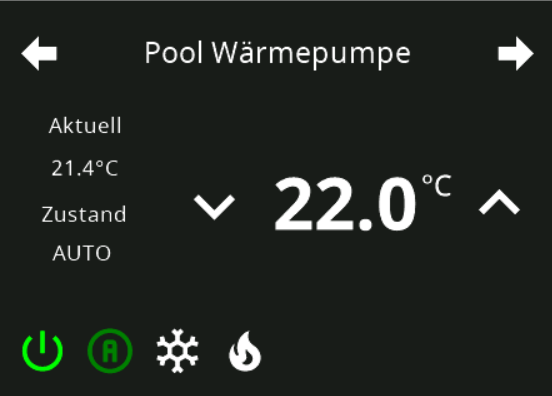
Role airCondition whose MODE state lists only OFF, AUTO, COOL and HEAT in common.states – accordingly exactly four icons appear.
6. Eight slots and the paging arrow
The bar at the bottom has exactly eight slots. The adapter fills them in this order:
- the mode icons of an
airConditionchannel (OFF,AUTO,COOL,HEAT,ECO,FAN_ONLY,DRY), POWER,BOOST,WINDOWOPEN,PARTY,MAINTAIN,UNREACH,LOWBAT,ERROR,VACATION,WORKING– each only if the state is present.
It follows that:
- Up to eight slots all appear. With seven or eight they start at the first place; with six and fewer the adapter indents them towards the middle.
- From the ninth slot on the eighth place becomes the paging arrow (arrow to the right), and seven slots remain per page. The arrow is not configurable, cannot be moved and pages in a circle.
- A fully equipped alias exceeds the eight places easily:
thermostatcan generate ten slots,airConditionwith seven modes twelve. Then the bar always has two pages. - Every generated slot costs a place. Whoever wants to influence the order or the selection has to remove states from the alias – in the admin there are no own page items for this card.
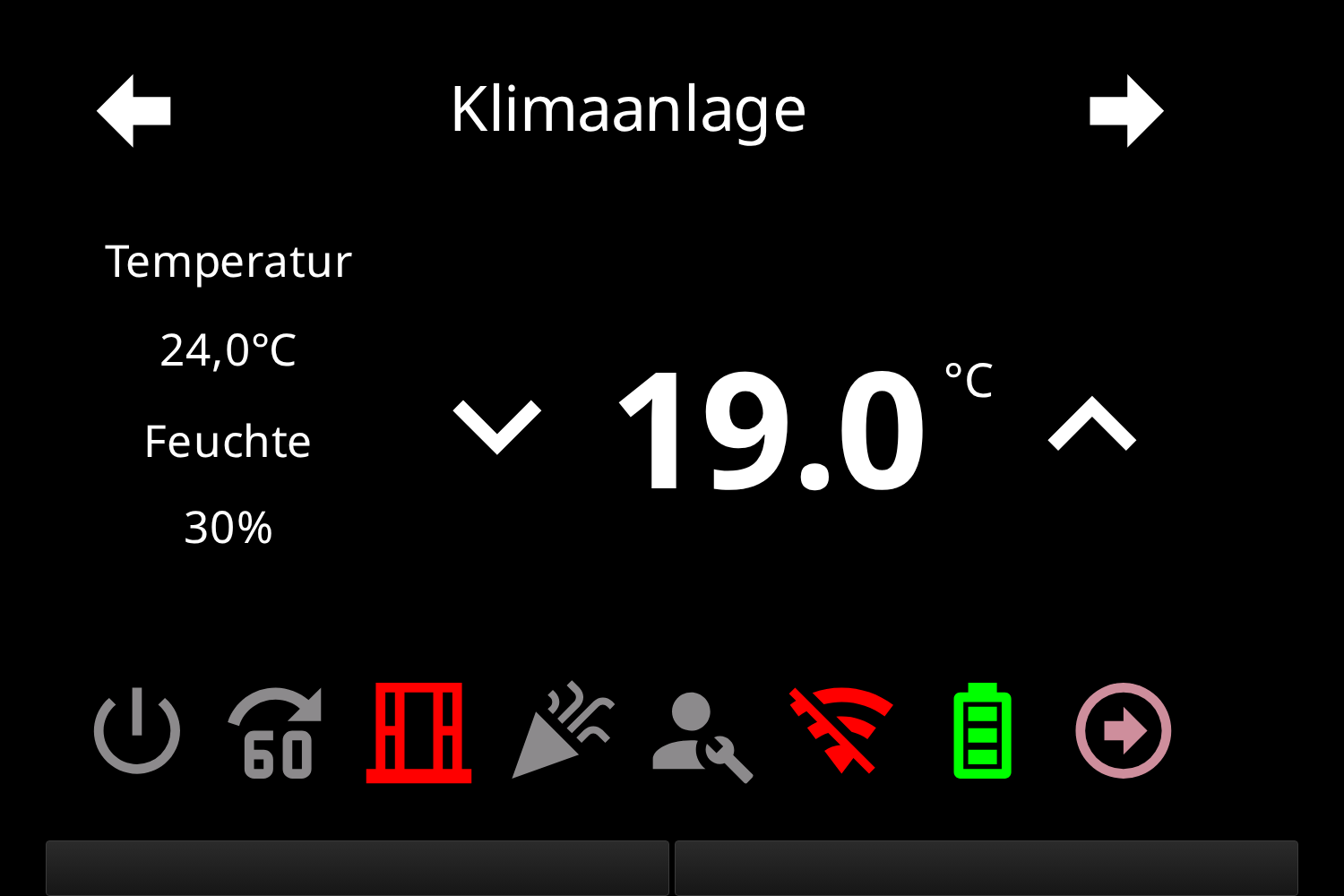
The picture shows a complete thermostat alias: on/off, boost, window open (red, because it is open),
party, maintenance, unreachable (red, because it is unreachable right now), battery (green, because it is full) — and on the eighth
place the paging arrow; the second page shows the remaining three (ERROR, VACATION, WORKING).
7. Saving, panel assignment, navigation
- On the right in the area Navigation/Panel assign the panel and set the navigation (
prev,next,parent,home) – like for the other page types. Withoutnext/prevof its own the page is only reachable when another page points at it with itsprev/nextor a page item has it as a target; a neighbour that arises that way is shown in the field in grey. - At the bottom Save or Save and close. The instance restarts afterwards and builds the page.
- If the card stays empty (no channel, object missing, wrong role,
SETnot found), the reason is in the log of the instance as an error.
8. Take-over from the script
The migration turns a cardThermo page of the script into an entry of this page type. Taken over are: heading → Headline, items[0].id → Thermostat channel, items[0].unit → Unit, minValue/maxValue/stepValue → the three numbers (unchanged, see section 4).
Styling the panel showed before is lost in the process – the admin has no equivalent for this card:
- Further items. All
itemsafteritems[0]are built by the adapter on the script path as own slots behind the generated buttons. The take-over drops them without notice; the preview counts 0 elements for the page. - The mode popup. With
setThermoAliasandpopupThermoMode1topopupThermoMode3up to three selection lists are created on the script path; only through them does the panel release the additional button that opens this popup.namesupplies its headline,onColorthe color; the icon in the popup is fixed. The lists occupy none of the eight places. The take-over drops that too; afterwards the button on the panel is missing. - Without effect on both paths are only
iconArray,setThermoDestTemp2andpopUpThermoNameas well as the icon, color and name fields ofitems[0]apart fromnameandonColor.
The page is skipped – and thus left in the script – only when the admin entry would build a different page: no item, items[0] without id (or a navigation or native item), a unit that is not text or is empty, a minValue/maxValue/stepValue that is not a number, or a field this page does not have (the paging fields, for instance).
Pitfalls
- Nothing works without a running instance. All fields are locked and the channel is not checked.
- An unusable channel can be saved. The editor only warns. The page is then created as an empty card, the reason is in the log as an error.
- "Screensaver behavior" has no effect on this card. When building the page the adapter resets the setting to Default timeout – even Never activate and Inherit from previous page stay without consequence (known bug). Hidden and Start page (main) work normally.
- An empty unit costs the unit of the actual temperature. The big number then gets
common.unitof the set temperature state, but the line of the actual temperature gets no unit at all. Whoever wants to see°Centers it. - The unit of the humidity is fixed to
%and cannot be changed. - The maximum determines the unit of all three numbers. If only the maximum is left empty, minimum and step count as tenths of a degree while the maximum comes from the state – a
15in the minimum thus becomes 1.5 °C. Either fill all three fields or leave all three empty. - Up to and including 2.2.0 the bar looked different.
MAINTAINoccupied two places (two wrenches), the mode icons afterAUTOshowed the outlined A of the automatic mode when inactive, withoutcommon.statesthe fan was missing (FANinstead ofFAN_ONLYin the substitute list), and a value → keyword mapping produced no mode row at all – only a list did. The version after 2.2.0 fixes all four; when counting the eight placesMAINTAINcounts once since then. SET,SET2andVACATIONare found by name. With anairConditionchannel the set point states have to be named exactlySETandSET2,VACATIONexactlyVACATION(notVacation). With the rolethermostatthe rolelevel.temperatureis enough for the set point.- The bar cannot be sorted. Order, icons and colors of the generated slots are fixed. Own slots and the mode popup are known to this card in a script configuration only; the migration does not take them along (see section 8).
